Manually Adjust GST for Imported Goods
Sometimes a bill contains a GST amount that does not match the normal 10% calculation. This usually happens when importing goods from overseas.
A freight company (such as DHL or FedEx) may send you a small invoice for their service, but the GST on the bill may be very large. This is because the GST is charged on the value of the imported goods, not just the freight cost.
Since the GST does not match the usual percentage of the invoice amount, you need to manually adjust it when recording the bill in Gimbla.
🌍 Global Note: This guide uses Australian GST as
an example, but the same method works anywhere in the world. You can
use this 3-line trick
to adjust import taxes such as
VAT in the UK and Europe, or
GST in New Zealand, Canada, and Singapore.
🧭 Navigate To
👣 Walkthrough
Example: You receive a freight bill for $15, but it includes $10 of Import GST.
If you simply enter $15 and apply 10% GST, the system will only
calculate $1.50 in GST. To record the correct $10 GST amount, we use
a simple 3-line trick
.
1 Go to your Bills dashboard and click Add Bill
.
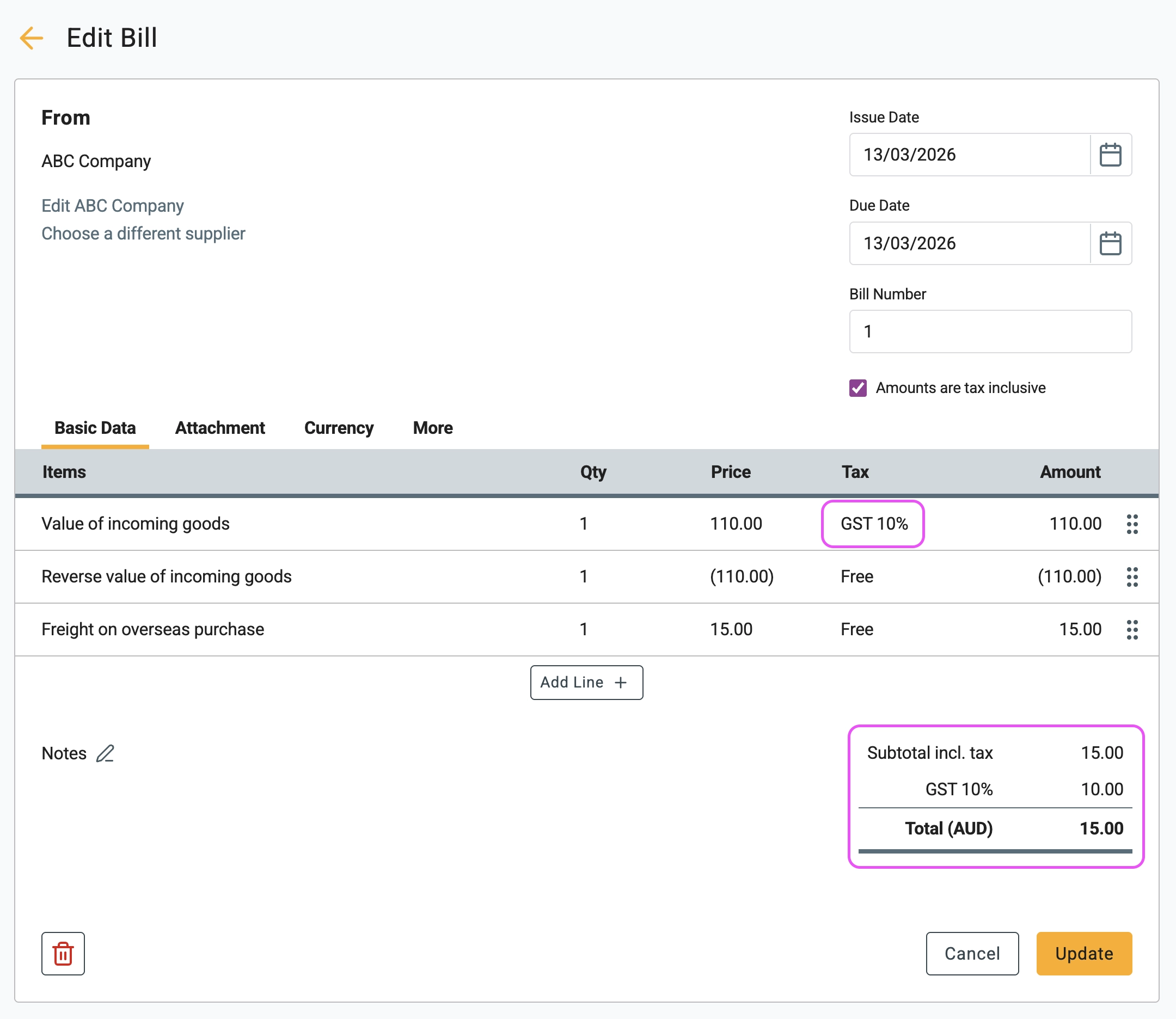
2 Tick Amounts are tax inclusive
, then enter the bill
using these three lines:
- Line 1 — Dummy Value
Enter a value that produces the GST amount you need.
Example: To create $10 GST, the tax-inclusive amount must be $110. Enter $110 and select GST 10%. - Line 2 — Reversal
Enter -110.00 and select Free for the tax. This cancels out the cost but keeps the GST recorded. - Line 3 — Actual Service
Enter the real charge from the freight company (for example $15) and select Free for the tax.
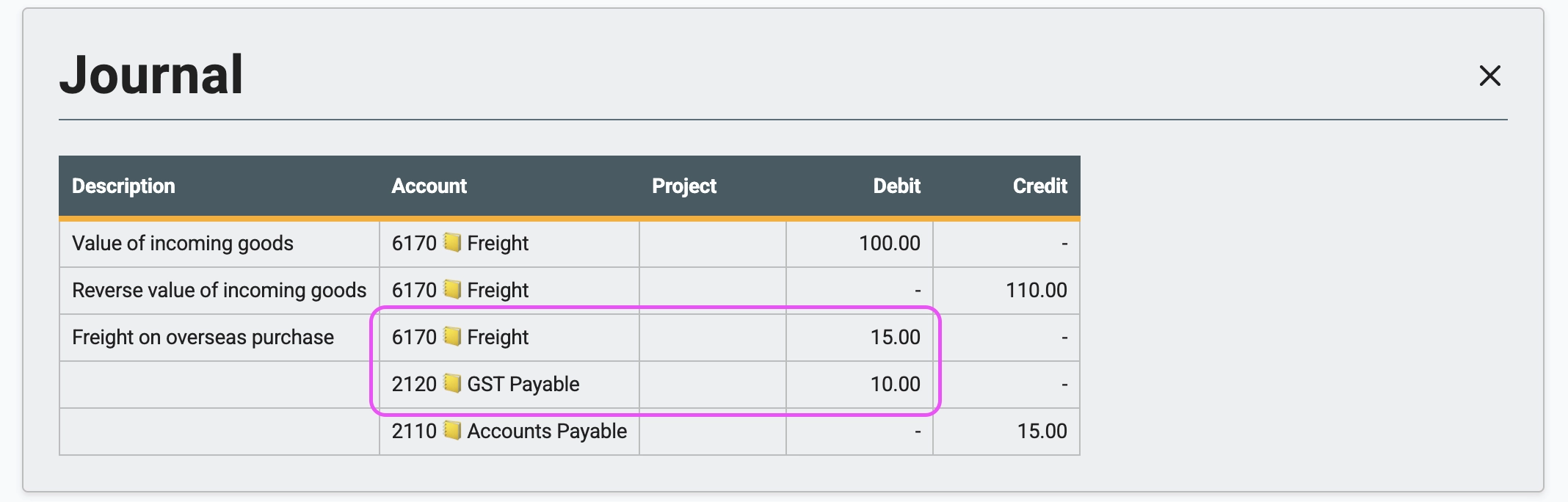
3 If you check the journal entry behind the bill, you will see that the dummy values cancel each other out. The final result is a $15 expense and $10 GST.
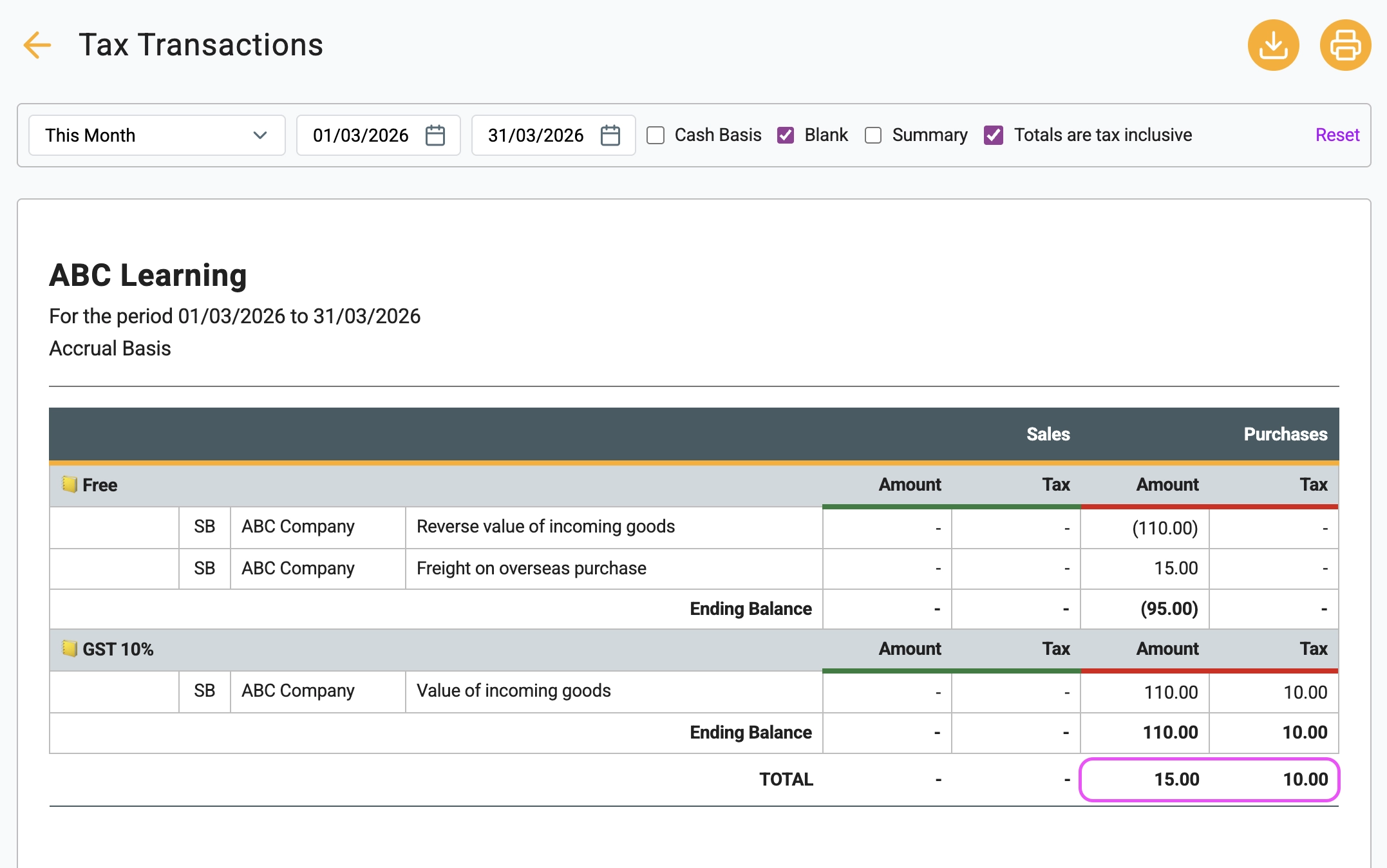
4 In your Tax Transactions report, the purchase will appear as $15 while the GST amount is correctly recorded as $10. This ensures you claim the correct GST when lodging your BAS with the ATO.
🖇️ Plain English Guide to Import GST
Import tax paperwork can be confusing when you first start importing goods. Here is a simple explanation of what is happening.
- Why is the GST so high?
When goods enter a country, tax is charged on the value of the imported goods (often including shipping and insurance). The freight company usually pays this tax to customs on your behalf and then asks you to reimburse them. - Why do we need the 3-line trick?
Accounting software normally calculates tax as a fixed percentage. If you enter a $15 bill, the system expects the GST to be $1.50. The 3-line method is a bookkeeping workaround that allows you to record the exact GST amount from the customs charge. - Keep your import documents
To claim the GST credit, you must keep the official import documentation. In Australia this includes forms such as the Import Declaration (N10 or N30) and the customs broker invoice. - Deferred GST schemes
Some countries allow businesses to defer import GST instead of paying it upfront. In Australia this is called the Deferred GST Scheme. Instead of paying the GST at the border, it is reported on your next BAS.