How to Pay Super for Contractors in Gimbla
Published May 4th, 2026 | Updated August 11th, 2026 | Team Gimbla
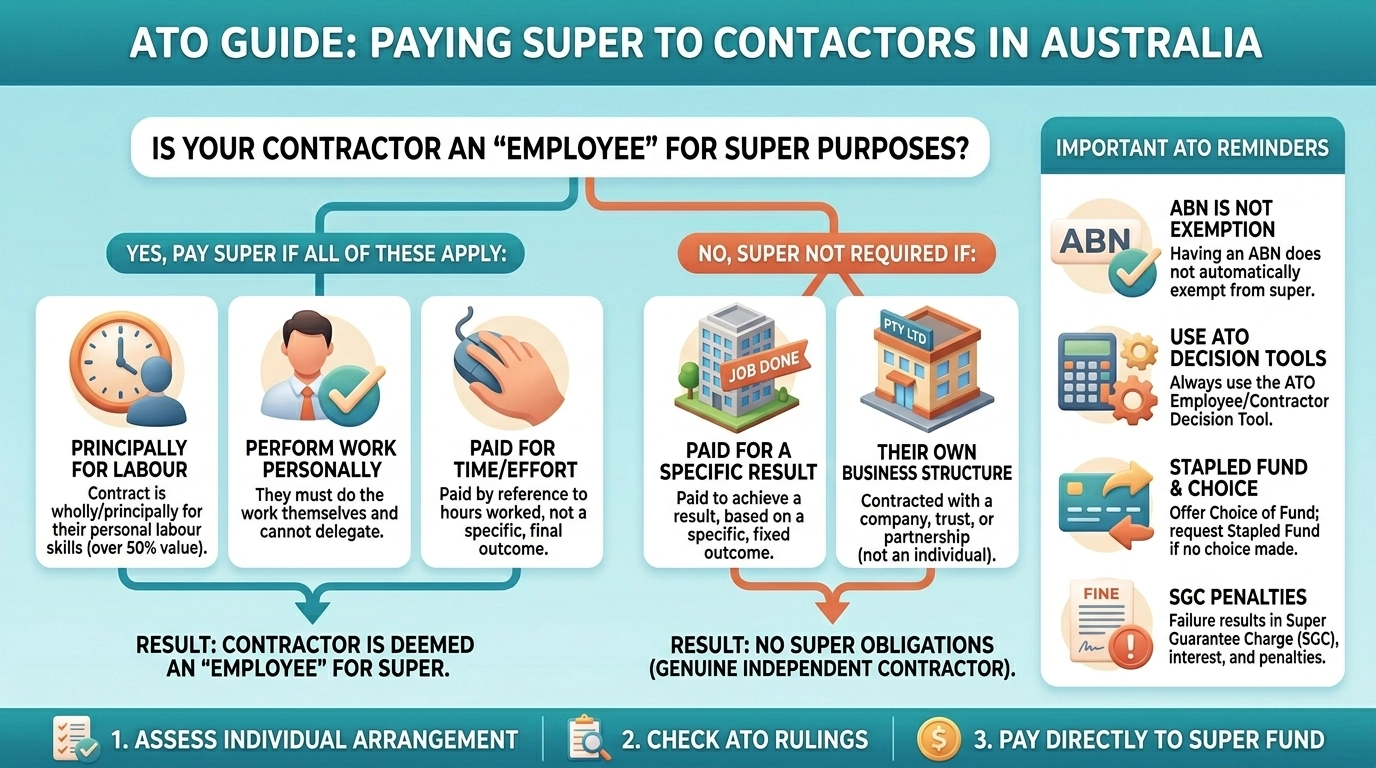
Some contractors may be entitled to superannuation even though they invoice through an ABN. If you have confirmed that super applies, Gimbla lets you set the worker up with the Non-employee employment basis, add the required contribution to a pay run and submit it through the Beam clearing house workflow.
The important order is: decide the obligation first, calculate super from the correct qualifying earnings, then use the software to record and pay the amount. Gimbla does not decide whether a person is an employee or contractor for super purposes.
A contractor label, invoice or ABN does not settle the super question. Check the working arrangement and the current ATO rules before you configure the worker or calculate a contribution.
Quick answer
The ATO explains that some contractors are treated as employees for super guarantee purposes. This can include an individual engaged under a contract that is principally for their labour, but the result depends on the arrangement.
Once you have confirmed the treatment, the Gimbla workflow is:
- Connect the Beam super payment integration.
- Add the contractor with the Non-employee employment basis.
- Add Superannuation Guarantee under Contributions in the worker’s Pay Template.
- Prepare and review the pay run, including the qualifying earnings and contribution.
- Post the pay run, select Pay Super, submit the contribution and follow the displayed payment instructions.
- Check the submission and payment status, and resolve any validation or fund-detail errors.
Key points
- Some contractor arrangements create a super obligation even when the worker has an ABN.
- The contribution should be based on qualifying earnings, not automatically on the total of every invoice.
- Payday Super has applied from 1 July 2026, so payment timing now follows the payday-based rules.
- The ATO’s Small Business Superannuation Clearing House closed permanently on 1 July 2026.
- Gimbla’s Non-employee basis separates this workflow from ordinary employee payroll and STP reporting.
- Beam handles the clearing-house submission within Gimbla; the employer still needs to approve, fund and monitor the payment.
Confirm whether contractor super applies
Start with the substance of the arrangement, not the label on the contract. The ATO’s contractor-super guidance explains that a worker may be an employee for super purposes if they work under a contract that is wholly or principally for their labour.
That does not mean every contractor invoice attracts 12% super. Before setting up the contribution, confirm:
- whether the contract is with the individual or with another legal entity;
- what the worker is being paid to provide;
- whether the worker must perform the labour personally;
- which amounts are qualifying earnings for super purposes; and
- whether an exclusion, exception or different treatment applies.
If the arrangement is unclear, ask a registered tax adviser or employment-law professional. A software setting cannot correct a mistaken worker-classification decision.
What Payday Super changed
Payday Super started on 1 July 2026. The current framework generally requires an employer’s super contribution to reach the fund within seven business days of payday, unless a longer period or an exception applies. Employers also need to identify qualifying earnings in payroll reporting.
This timing matters for a contractor-super workflow. Preparing the payment after the pay run is not enough on its own: allow time to correct missing fund details or a rejected submission before the fund-receipt deadline.
The ATO’s Small Business Superannuation Clearing House closed permanently on 1 July 2026. Businesses that used it need another SuperStream-compliant payment method and should retain any records they downloaded before closure.
| Current position | Practical consequence |
|---|---|
| Some contractors may be employees for SG purposes | Assess the engagement before configuring payroll |
| The SG rate is 12% | Apply the rate only to the qualifying earnings you have confirmed |
| Payday Super uses a fund-receipt deadline | Submit early enough to fix payment or validation problems |
| SBSCH has closed | Use another SuperStream payment method, such as an integrated clearing house |
| Payroll needs qualifying-earnings information | Keep the calculation and supporting records with the pay run |
How Gimbla handles contractor super
Gimbla’s contractor-super workflow is for a person who should not be processed as an ordinary employee in payroll or STP, but for whom you have confirmed a super contribution is required. The Non-employee employment basis keeps the worker out of ordinary employee payroll reports and STP submissions while allowing the super contribution to move through a pay run.
Use that setting only when it matches the engagement. If the person should be treated as an employee more broadly, set them up under the appropriate employee basis and payroll settings instead.
1. Connect Beam
Complete the Beam registration and connection before the first payment is due. Confirm the business details and bank or payment information used by the super payment workflow. Leaving setup until the deadline reduces the time available to fix validation issues.
2. Add the worker as a Non-employee
From Payroll → Employees, add the worker and select Non-employee as the employment basis. Enter the identity and super-fund details needed for the payment and review them against the information supplied by the worker.
3. Add the contribution to the Pay Template
Open the worker’s Pay Template and add Superannuation Guarantee under Contributions. This makes the contribution available when you generate the pay run.
Do not assume the full invoice value is the contribution base. Use the qualifying-earnings amount you have confirmed for that engagement, and keep the basis for the calculation.
4. Prepare and review the pay run
Generate the pay run and review the contractor’s super amount before posting it. Check the worker, pay date, qualifying earnings, SG rate, calculated contribution and fund details. Manually adjust the contribution if the reviewed amount differs from the template calculation.
5. Post and submit the super payment
After posting the pay run, select Pay Super and follow the on-screen steps to submit through Beam. Correct any displayed validation errors before continuing. Once the submission is accepted, use the supplied BPAY reference and payment details to fund it.
6. Monitor the result
Submission is not the final check. Confirm the payment status and investigate a rejection, returned contribution or fund-detail error promptly. Reconcile the paid amount with the pay run, bank transaction, super liability and clearing-house record.
Simple example
A sole trader engages an individual for work and obtains advice that the contract is principally for the person’s labour. The adviser confirms that $2,000 paid on the payday is qualifying earnings for this example.
At a 12% SG rate, the contribution is:
| Calculation | Amount |
|---|---|
| Qualifying earnings | $2,000 |
| SG rate | 12% |
| Super contribution | $240 |
The business adds the worker in Gimbla as a Non-employee, records the $240 contribution in the pay run, posts the run and submits it from Pay Super. It then follows the BPAY instructions and checks that the contribution reaches the fund within the applicable timeframe.
This is an illustration, not a rule that every $2,000 contractor invoice creates a $240 super obligation. The classification and qualifying-earnings decision comes first.

Records to keep and checks to complete
Keep enough evidence to explain both the decision and the payment. Depending on the engagement, that may include:
- the contract and relevant invoices;
- the worker-classification assessment or professional advice;
- the qualifying-earnings calculation and SG rate used;
- the worker’s fund and member details;
- the approved and posted pay run;
- the Beam submission reference, BPAY record and payment status;
- evidence of any rejected or returned contribution and its correction; and
- the accounting entry and bank reconciliation.
These records make it easier to resolve a fund error, answer an adviser or ATO query, and confirm that the payroll and ledger agree.
Common mistakes to avoid
Treating every contractor invoice the same way
Contractor-super treatment depends on the arrangement. Do not add 12% to every invoice without checking whether super applies and which amount is qualifying earnings.
Relying on an ABN as the answer
An ABN does not by itself remove a super obligation. Review the actual contract and work performed.
Using Non-employee for an ordinary employee
The Gimbla setting controls the software workflow; it does not change the legal character of the engagement. Use the appropriate employee setup when ordinary payroll and STP treatment applies.
Waiting until the deadline to submit
Missing fund details and validation errors take time to correct. Submit early enough for the contribution to reach the fund within the applicable Payday Super timeframe.
Stopping after the clearing-house submission
Check that the payment was funded and processed. A submission reference alone does not prove that the fund received the contribution.
How Gimbla fits the workflow
Gimbla keeps the contractor’s contribution, pay-run record, super submission and accounting trail close together. Beam provides the connected clearing-house path, while the Gimbla workflow lets you review the contribution before posting and follow its status afterwards.
For screenshots and the current product steps, follow the Paying super for contractors user guide. You may also want the plain-English guides to Superannuation Guarantee, SuperStream and superannuation clearing houses.
Frequently asked questions
Which contractors may need super?
A contractor may be entitled to super if the arrangement meets the extended employee definition for super guarantee purposes, including some contracts principally for the contractor’s labour. An ABN or contractor label does not settle the question by itself.
How does Payday Super affect contractor payments?
If super is required for a contractor, the current Payday Super timing generally requires the contribution to reach the fund within seven business days of payday, unless a longer period or exception applies.
Does a Gimbla Non-employee appear in STP?
The Non-employee basis is designed to keep that worker out of ordinary employee payroll reports and STP submissions while allowing a super contribution to be processed. Confirm that this treatment fits the engagement before using it.
Can Gimbla submit contractor super through a clearing house?
Yes. After the pay run is posted, eligible super contributions can be submitted from Pay Super through Gimbla’s Beam integration, followed by the displayed payment and status steps.
In short
First confirm whether contractor super applies and calculate it from the right qualifying earnings. Then use Gimbla’s Non-employee setup, pay-run review and Beam integration to submit, fund and track the contribution. Keep the classification, calculation and payment evidence together.
Disclaimer: This article provides general information only and is not tax, superannuation, employment or legal advice. Check the current ATO guidance and obtain professional advice for your circumstances.